Enter password to view case study
Bringing Property Verification into the LOS
Connecting property research, source comparison, and application updates within the underwriting workflow.
User Research
Problem Framing
Information Architecture
Interaction Design
Product
PlatAI Loan Origination System
My role
Product Designer and design owner for the initiative
My contribution
Workflow analysis, property verification interface, and a proposed combined flow for reviewing and applying detected updates.
Status
Live · Combined Apply proposed
The starting point
We asked underwriters to walk us through their Manual Review workflow. The session was intended to help us understand their day-to-day work.
When applications required property verification, we saw them leave the LOS and begin an investigation across external websites and tools. Underwriters estimated that property verification accounted for around 80% of their Manual Review cases.
What was actually happening
Underwriters copied property addresses into Google, checked Zillow, and consulted county websites and property platforms. The sources varied by county and by the information they needed to verify.
They compared valuations, investigated ownership, and searched for missing parcel information. Sometimes they contacted the applicant and left a note recommending the next action for another underwriter.
They then returned to the LOS to update fields and attach evidence. For example, they captured a Zillow screenshot, converted it to PDF, added the application number to the filename, and uploaded it as evidence.
One workaround revealed a larger problem
An underwriter copied a Zillow value into a calculator before manually entering it into the AVM field. The input mask did not accept the copied value with commas, so the calculator became an intermediate step to help avoid mistakes.
Finding the value and applying it were disconnected tasks.

Reframing the problem
The session revealed two connected needs: access to property evidence and a practical way to use the findings in the application.
Reframed Problem
How might we help underwriters investigate property information and apply relevant findings without repeatedly moving between sources and application fields?
Bringing sources into the application
The team added property-data integrations, and I designed how underwriters would access the results within the LOS.
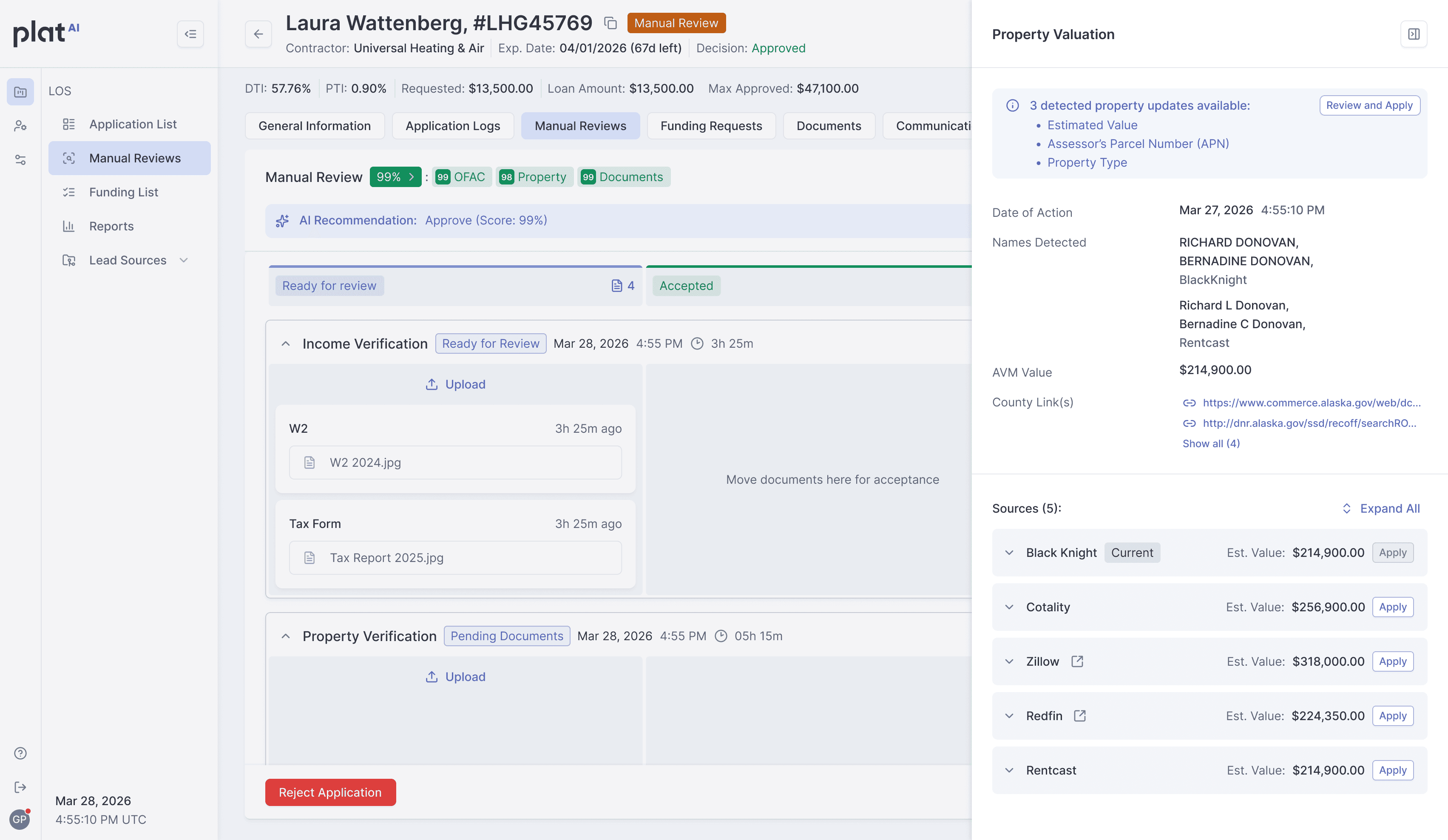
The Property Valuation Drawer brought together Black Knight, Cotality, Zillow, Redfin, and RentCast. It also surfaced detected names, the current AVM value, and county links for additional investigation.
Provider sections preserved source context. Underwriters could inspect results within the application and follow county links for further investigation.
Integration results are automatically tracked and stored in the LOS. For these sources, underwriters no longer need to capture screenshots, convert them to PDFs, and upload separate evidence.
Property Verification Drawer

From viewing a value to applying it
The implemented workflow lets underwriters apply an estimated property value directly from an individual integration. After reviewing a result, they can use Apply to transfer the selected value into the application.
This addresses the manual re-entry step observed during the walkthrough, including the calculator workaround. The current implementation supports Est. Value; APN and property type updates remain part of the proposed next iteration.
Review a provider result. Apply the selected value. Confirm the update.
Making the consequences visible
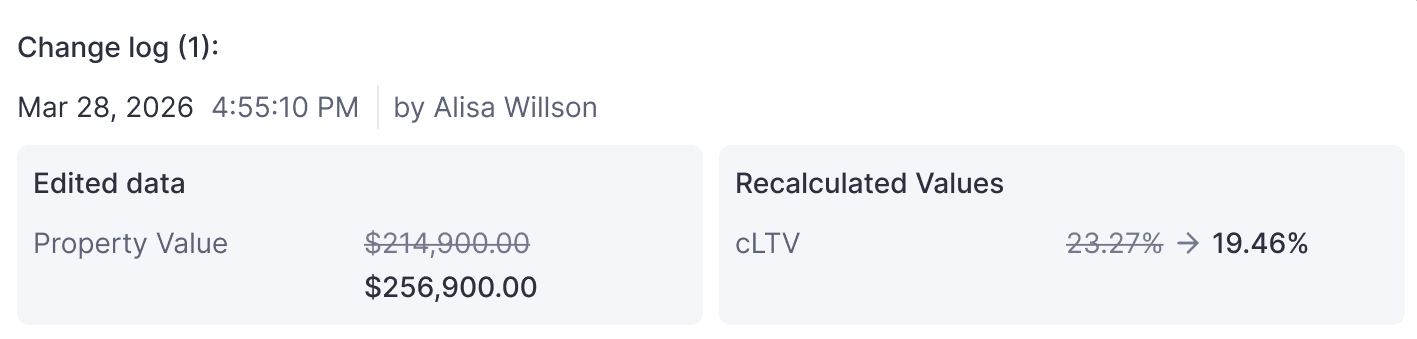
A property value update can affect other financial calculations. The flow therefore includes a review step before the underwriter confirms the change.
The dialog separates the edited property value from recalculated figures and shows previous and proposed values. For a property-value-only update with unchanged loan terms, cLTV changes while DTI, PTI, and the monthly payment remain unchanged.
This lets the underwriter review the consequences of applying a new value before committing the update.
Property Verification Drawer

Property Verification Drawer

Recalculation Log
Before / After
The information was always there. What changed was how much work it takes to find it.
Before
Visit provider sites separately
Copy or retype an estimated value
Use a calculator to work around input formatting
Capture screenshots, convert to PDF, and upload evidence
Implemented workflow
Inspect integrated results in the LOS
Apply Est. Value from a chosen provider
Transfer the selected value through Apply
Integration results automatically tracked and stored in the LOS
Before — Across multiple tools

After — Within the LOS

Reviewing related updates together
Once integration results were available in the LOS, I proposed extending Apply to multiple detected property details in one operation.
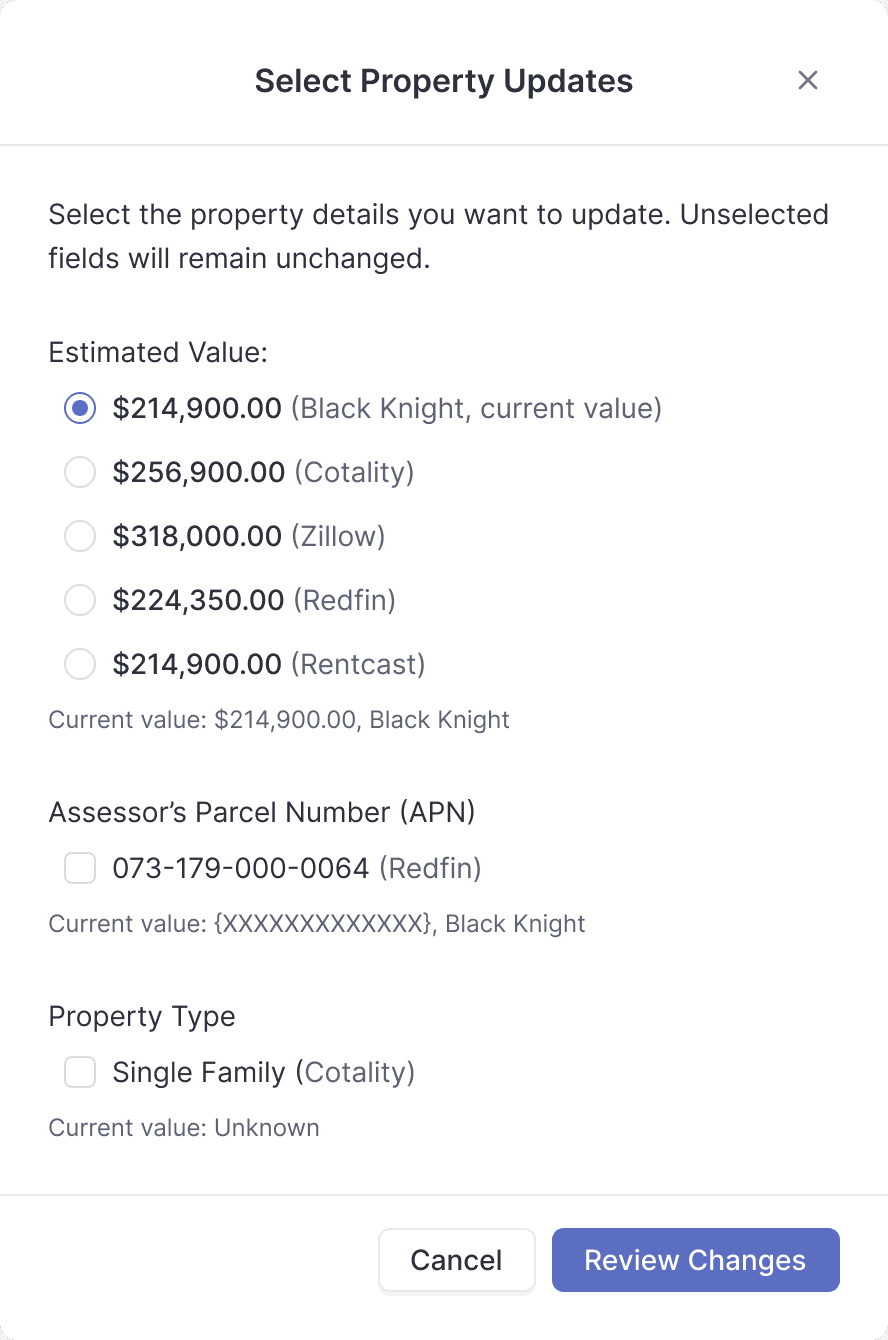
The combined "Review and Apply" flow would surface updates for estimated value, APN, and property type. Underwriters could review the detected information alongside current application values, choose the relevant updates, and submit them together.
Individual Apply actions would remain available for focused value updates. The combined flow would support cases where several related fields needed to change.
Proposed: review related property updates together before applying them.
Property Valuation Drawer

Values Selection
Changes Review
Reusing the review-before-update pattern
The proposal includes a Review Changes step using the existing confirmation pattern. This screen is currently a template; the specific relationships between combined field updates and recalculated values still need to be mapped.
Building on the implemented foundation
Integrated results are already tracked and stored automatically in the LOS, and individual Apply is available for estimated values. The next iteration focuses on reviewing and applying related property fields together. The combined flow remains a design proposal.
Design decisions and trade-offs
Preserve source context
Providers can return different valuations. Keeping sources identifiable supports investigation while leaving the choice of value with the underwriter.
Review financial consequences
Confirmation adds an interaction, but makes the edited value and recalculated figures visible before submission.
Support focused and combined updates
The implemented Apply handles an individual estimated value. The proposed combined flow extends that pattern to related property fields.
Keep external research accessible
County links support further investigation when integrated results are insufficient. Source disagreement and incomplete coverage still require judgment.
My contribution
I translated the workflow observations into an experience connecting property results with application updates. I designed access to provider information and the interaction for applying an estimated value within the LOS.
My specific proposal for the next iteration was a combined review-and-apply flow for estimated value, APN, and property type.
Reflection
Watching an underwriter use a calculator to transfer a property value made the workflow problem concrete. The effort extended beyond finding information to moving it between tools and recording it in the application.
The implemented experience connects provider results with estimated value updates and automatically retains integrated source data. It removes manual value re-entry and separate screenshot-to-PDF evidence preparation for integrated sources. The proposed next iteration extends Apply to other property fields; its benefits still need to be validated in use.
The design opportunity was in the handoff between finding evidence and acting on it.
© 2026 tetyana.voronova
My contribution